

Features
Mail that sorts itself around the people you know.
Parcetta is a Mac app for your Gmail and Outlook accounts. Keep your address and everything in it; change how it feels to read.
The Screener
Strangers wait. People you know don't.
The first time someone emails you, their message waits in the Screener instead of your inbox. Let them in and they go straight to your inbox from then on; block them and you won't see them again.
People you've written to are let in already, and so is everything that was in your inbox before you started. You can decide for a whole domain at once.
- Gmail keeps up: waiting mail moves under a Parcetta/Screener label, and blocked senders get a Gmail filter, so your phone agrees.
- Outlook keeps up: waiting and blocked mail is moved out of the inbox.
On your Mac
Fast, because it's already here.
Parcetta keeps your mail on your Mac, so lists open and search answers at once. Gmail and Outlook accounts sit side by side, each with its own name, colour and icon, in one inbox or one at a time.
It starts with your newest mail and brings in older mail when you ask. Searching finds what's on your Mac instantly, and can ask Gmail or Outlook for anything older.
- Folders and labels from Gmail and Outlook, plus your own
- Archive, Trash, Move to and Mark Unread from the toolbar or the keyboard
- Write, reply and forward, with a signature per account
Calendar
Invitations you can answer where they arrive.
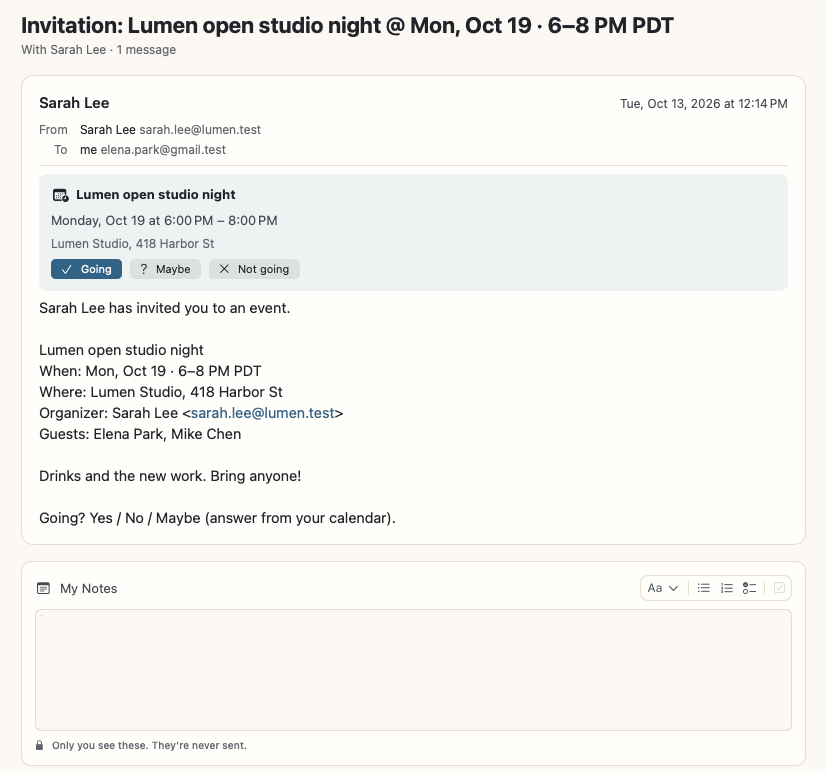
An invitation shows as a card at the top of its email, with Going, Maybe and Not going. Your answer goes to the organizer through your own calendar.
When a message mentions a time (“Saturday at 10”), Parcetta offers to add it to your calendar. The week view shows your Google and Outlook calendars together, and an event links back to the email it came from.
Reminders and notes
Bring it back later. Keep your thoughts beside it.
Remind Me brings a conversation back in 30 minutes, an hour, tomorrow morning, next week, or any time you pick, with a notification that opens it.
My Notes are private notes on a conversation, with headings, lists and to-dos. They live only on your Mac and are never sent to anyone. You can keep notes of your own too, outside any email.
Safety
It reads the fine print for you.
Parcetta checks every link: one that shows one address and goes to another, hides behind an @, uses look-alike letters or goes to a bare IP address gets a warning before it opens. A message whose sender couldn't be verified, asking you to sign in or confirm something, is flagged.
- Open-tracking pictures are dropped before the message is shown
- Pictures from senders can wait until you ask (Settings → Ask before showing pictures)
- Designed emails can't run scripts, submit forms or take you to another page
- One-click unsubscribe, the way the sender asks for it
Everything else
Files
Every attachment in one place, and PDF tools on your Mac. See Files.
Notifications
New mail from people you know, and reminders when they're due. Strangers in the Screener don't ping you.
Light and dark
Follows your Mac, or pick one in Settings.
Updates itself
New versions arrive quietly and install when you say.
Several accounts
Personal Gmail and work Outlook together, each clearly marked.
iPhone, soon
The iPhone app is on its way. Windows and Android come later.
See it with your own mail.
Join the beta, connect Gmail or Outlook, and your mail is there in a minute or two.